Description
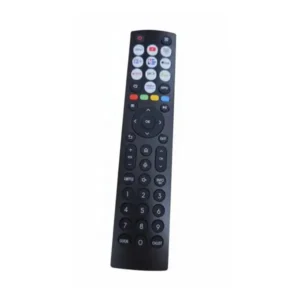
Original solar remote control for Hisense TV U82 series | ERF6G66H
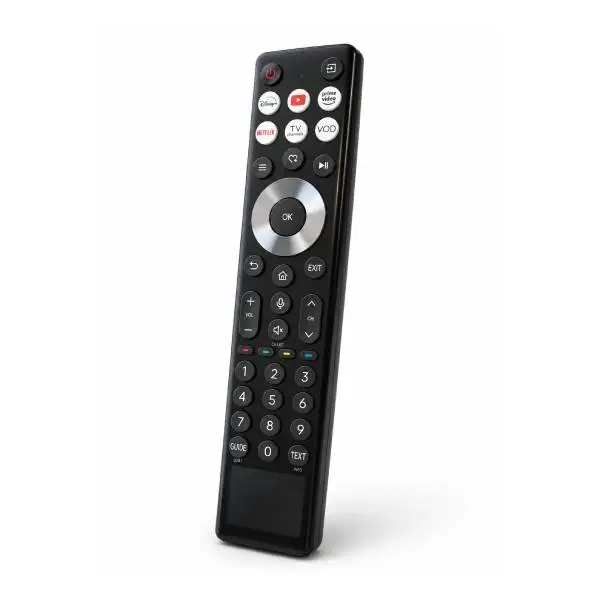
Original remote control ERF6G66H is designed for Hisense ULED U82 series televisions.
It features an internal rechargeable battery with dual charging: solar panel and USB Type-C port.
In addition, it offers voice control, direct access buttons for Netflix, Prime Video, Disney Plus, and YouTube, and Bluetooth connectivity for precise control.
The remote control replaces the original one that was broken or lost with full compatibility.
Is your remote broken? Lost? Unresponsive?
In our experience, the original ERF6G66H remote control is the only safe solution for Hisense U82 series TVs.
Non-original remotes may not support voice control, Bluetooth connectivity, and the TV's Hi-View Engine capabilities.
Now click on the “Check Model Compatibility” button at the top of the page. Make sure the remote fits your model before ordering.
Why only an original remote control for the Hisense ULED U82 TV?
Hisense U82 series TVs work with the VIDAA Smart TV system and Hi-View Engine PRO.
To Watch Over TV performance Full, including voice control, OTT broadcasts. Only an original remote is required.
A non-original remote may damage some functions and reduce the viewing experience.
In our experience at official service labs, non-original remotes cause sleep problems and Bluetooth pairing problems.
Replacing with an original ERF6G66H remote control solves the problem immediately and permanently.
How to find the model number of the TV?
The full model number is listed on a sticker on the back of the TV, at the bottom.
It can also be found in the settings menu: Settings > Support > About TV > Model Number.
It is important to compare the full model number to the compatible models list before ordering.
📋 Technical specifications
| attribute |
Details |
| Manufacturer's SKU |
ERF6G66H |
| brand |
Hisense |
| Connection type |
Bluetooth and IR (infrared) |
| Voice control |
Yes |
| Battery type |
Internal rechargeable battery (lithium) |
| Charging methods |
Solar panel and USB Type-C |
| Charging specifications |
DC 5V, 500mA |
| Streaming buttons |
Netflix, Prime Video, Disney Plus, YouTube |
| התקנה |
Bluetooth pairing required before use |
| material |
High-quality ABS |
✅ Compatible models
The part fits the following models (make sure it matches the model number on the back of the TV):
U82 series:
⚠️ Important: Please verify the full model number before ordering. If your model is not listed, please contact us before purchasing.
🔧 Operating, charging and adjustment instructions
Charging the remote before first use
The ERF6G66H remote control comes with an internal rechargeable battery. Before first use, it is recommended to fully charge it:
- Charging via USB Type-C:
Connect a Type-C cable (not included) to the port on the bottom of the remote and to a power source (wall charger, computer, or TV USB port).
A red light will flash while charging and turn off when charging is complete. Full charging time: approximately 2 to 3 hours.
- Solar charging:
Place the remote with the solar panel (the black stripe on the front) facing the light.
Solar charging is sufficient for normal daily use and reduces the need for manual charging.
Pairing with the TV
- Charge the remote before first pairing.
- Turn on the TV.
- Point the remote at the TV, from a distance of up to 3 meters.
- Press the Back and Home buttons simultaneously, and hold for at least 3 seconds.
- Wait until the LED indicator on the remote starts flashing.
- The TV will confirm the pairing on the screen.
Once paired, the remote will also work with IR for basic control. In addition, voice control is available for searching for content, opening apps, and changing settings.
💡 Tip from the experts
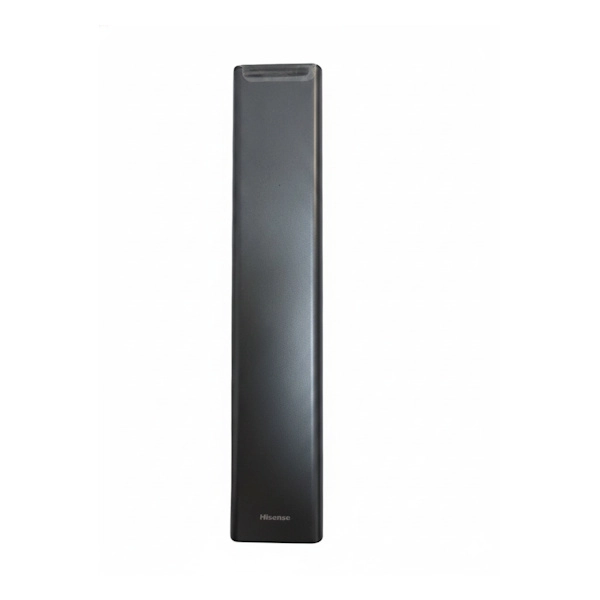
The solar panel of the ERF6G66H remote control is located on the front.
To maximize solar charging efficiency, place the remote on a surface in the living room facing natural or artificial room light.
This will ensure that the battery stays charged for a long time and reduce the need for manual charging via USB Type-C.
❓ Frequently Asked Questions
Does the ERF6G66H remote work with all Hisense TVs?
No. The ERF6G66H remote is specifically designed for the Hisense U82 series. Different remotes use different IR and Bluetooth protocols.
Using an incompatible remote may result in only partial operation, without voice control.
Check compatibility by the full model number on the back of the TV before ordering.
How do you charge the ERF6G66H remote?
You can charge in two ways: connecting a USB Type-C cable (not included) to the port on the bottom of the remote, or exposing the solar panel on the front to light.
When charging via Type-C, a flashing red light indicates active charging and turns off when charging is complete. Full charging time is approximately 2 to 3 hours.
What is the difference between an original remote and an unauthorized replacement remote for a Hisense TV?
The original ERF6G66H remote ensures full compatibility with the TV's Bluetooth protocol, active voice control, and support for all streaming buttons.
An unauthorized remote may only work partially, without voice control, and sometimes without the Netflix and YouTube buttons.
Why is the remote not responding?
Common reasons: empty internal battery, broken link, or liquid-damaged remote.
First, charge the remote for at least two hours via USB Type-C.
Then re-pair. If the problem persists, the remote may be damaged and needs to be replaced.
⏱️ Delivery times:
- Most localities: within 10 business days
- Golan Heights, Arava, Eilat and settlements beyond the Green Line: within 10 business days


 Marom Service The official service company for Kitchen & Home Appliances from Sharp, Bloomberg, Haier, Zanussi, Auchent, DeLonghi, Magimix, KitchenAid and Tefal