Description
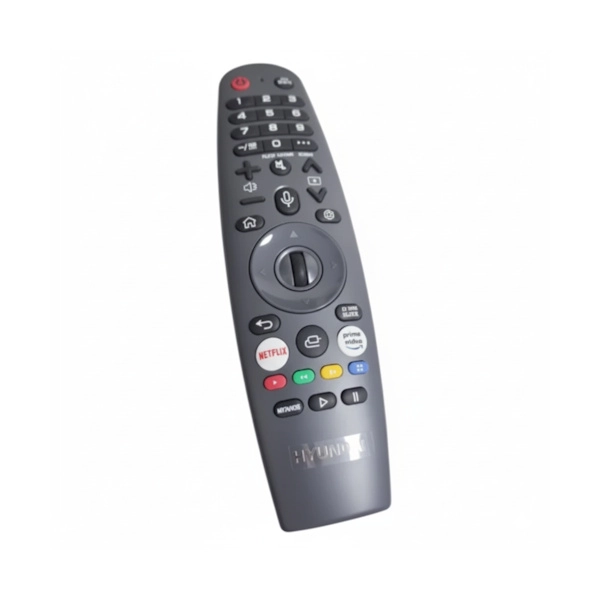
Original Magic Remote for Hyundai TV HATV-65DL400
The original remote control for the Hyundai HATV-65DL400 TV is the component that connects you to the smart screen.
It includes voice control in Hebrew, quick access to apps, and precise navigation with an air mouse.
An original remote ensures the device's performance and the full functionality of the WebOS 22 system.
Thousands of customers They've already solved this problem with this exact sign.
Our certified technicians at official service laboratories indicate that this is one of the most requested accessories for Hyundai TVs.
Due to its precise fit and speed of operation, click the “Check Model Compatibility” button at the top of the page before ordering.
💡 Why an original remote control – and not an unapproved replacement?
The HATV-65DL400 television runs on the Hyundai-certified WebOS 22 system.
To enjoy all the capabilities of the smart screen, only an original, manufacturer-approved remote control is required.
✅ Voice control in Hebrew – Search for content, change settings, and navigate without typing.
✅ Dedicated shortcut buttons – Direct access to Netflix, Prime Video, Disney+ and YouTube with one click.
✅ Precision Air Mouse – Smooth navigation through menus and applications, like a computer mouse.
✅ Bluetooth connection – Works without being directly aimed at the screen, even behind your back.
Unapproved replacement remotes do not support voice control and air mouse.
They may also affect the device's performance after software updates. That's why the official service only provides original remotes.
✨ The upgrade you feel immediately
An original, manufacturer-certified remote control doesn't just replace an old remote control - it upgrades the entire viewing experience.
When you press the voice button and say “Netflix,” the TV responds immediately.
When you're looking for a movie, the air mouse pinpoints the cursor exactly on what you wanted.
All of these only work with an approved original remote.
💡 Tip from the experts: To connect a new remote to the HATV-65DL400 TV, turn on the TV and point the remote at it.
Press and hold the home button for about 5 seconds until a connection confirmation message appears on the screen.
🛡️Maintain screen performance
From our experience at Hyundai's official service laboratories
Most calls about “remote control problems” come after using an unapproved replacement remote control.
A durable original remote control, calibrates correctly and is compatible with future software updates.
Therefore, using an original remote saves expensive service calls later.
📍 How do you find the TV model number?
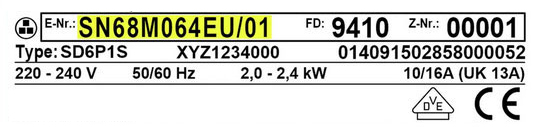
You will find the model number on the sticker on the back of the TV – look for the “Model” or “Type” field.
Alternatively, find it through the settings menu under “About.” The model number is essential to verify remote compatibility before ordering.
Technical
| attribute |
Details |
| brand |
Hyundai – Hyundai |
| Model compatibility |
65DL400, HATV-65LD400, HATV-55LD400, HATV-50LD400, HATV-85LD400 |
| Type of sign |
Magic Remote Control |
| Connection |
Bluetooth + IR |
| Voice control |
Yes – Hebrew |
| Shortcut buttons |
Netflix, Prime Video, Disney+, YouTube |
| Navigation |
Air mouse |
| התקנה |
Self-service – instant connection |
| צבע |
black |
FAQ
How do I connect a new remote to a Hyundai WebOS TV?
Turn on the TV and point the new original remote at it.
Press and hold the Home button until a confirmation message appears on the screen.
The TV automatically recognizes an original remote within a few seconds, without a code or special setting.
Why doesn't the remote control respond to the TV even after replacing the batteries?
When the remote does not respond even with new batteries, it has probably lost the Bluetooth link.
Press and hold the home button for about 5 seconds to re-register.
If the problem persists after registration, the remote may be faulty and needs to be replaced.
Is the remote also suitable for other Hyundai models?
The Magic Remote is tailored to specific models in the HATV series.
Therefore, it is important to verify compatibility before purchasing.
Click the “Check Model Compatibility” button at the top of the page and verify against the exact model number of your TV.
What is the difference between an original remote control and an unauthorized remote control?
Original, manufacturer-approved remote that supports all WebOS 22 capabilities – Hebrew voice control and a precise air mouse.
An uncertified remote typically does not support voice control, and may affect device performance after software updates.
How do you check if an existing sign is working properly?
Point the remote at the smartphone camera and press any button.
If the remote is working properly, you will see a flashing white-purple light on the camera – this is the infrared LED.
If you don't see any light at all even with new batteries, the remote is faulty and you should consider replacing it.
⏱️ Delivery times:
- Most localities: within 10 business days
- Golan Heights, Arava, Eilat and settlements beyond the Green Line: within 10 business days


 Marom Service The official service company for Kitchen & Home Appliances from Sharp, Bloomberg, Haier, Zanussi, Auchent, DeLonghi, Magimix, KitchenAid and Tefal